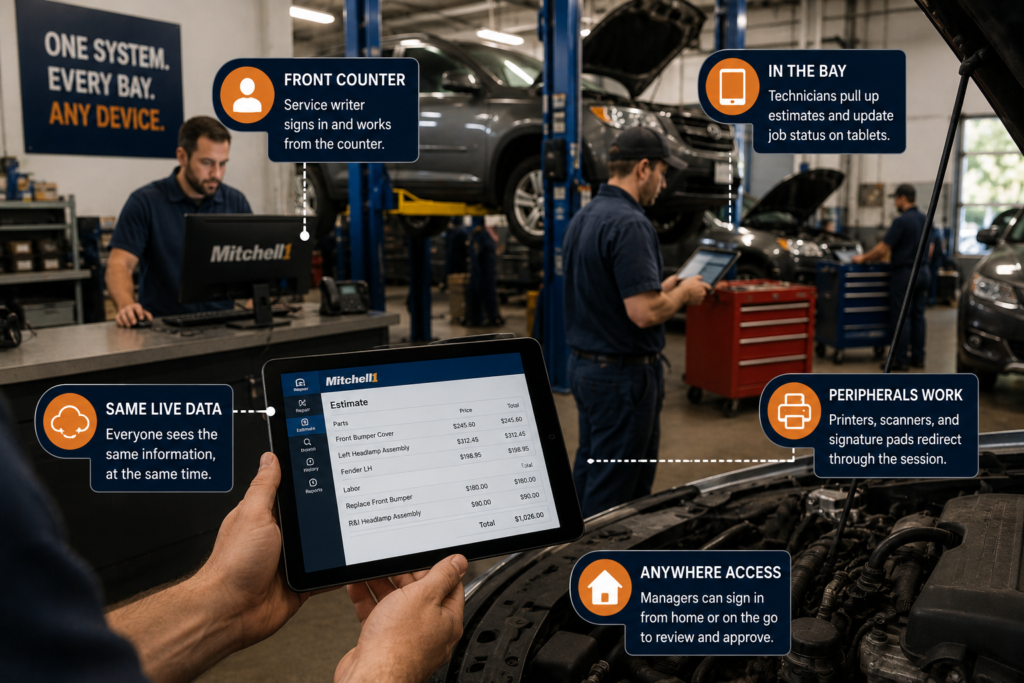
Parallels RAS auto shop software remote access means a technician signs in from a tablet at the vehicle the same way the service writer signs in from the front counter, both looking at the same live data, at the same time. No VPN, no waiting for a shared PC, no separate login process for people working from different spots in the shop. Here’s what that actually looks like across a real workday.
Key takeaways
- Parallels RAS auto shop software remote access publishes the application itself, not a full virtual desktop, so the software looks and behaves exactly like it does today.
- Sign-in works the same from a laptop at the counter, a tablet in the bay, or a phone in the parking lot.
- Printers, scanners, and signature pads redirect through the session, so paperwork and customer sign-off work the way the shop already does them.
- Multi-factor authentication is enforced on every login, on every device.
- Nothing about the software interface changes. Staff need no retraining.
Opening Up: Signing In From the Front Counter
The service writer opens a browser or the desktop client at the front counter and signs in with a username, password, and a one-time code from an MFA app. That’s the same login step regardless of which device or location someone’s working from, since Parallels RAS auto shop software remote access treats every entry point the same way from a security standpoint.
Once signed in, the software opens exactly as it always has: same layout, same menus, same shop data from yesterday’s close-out.
Mid-Morning: Working From the Bay, Not the Counter
A technician pulls up the same estimating software on a tablet mounted near the lift, without walking back to the counter to check a part number or update a job status. Because the application is published rather than run locally, the tablet doesn’t need Mitchell1 or any other shop software installed on it directly. It’s just a window into the same environment the counter PC is using.
Two, three, or ten technicians can do this at once, each in their own session, without anyone waiting on anyone else’s terminal.
Midday: Printing, Scanning, and Signature Pads Still Work Normally
When a customer needs to sign off on an estimate, the signature pad captures it the same way it always has, redirected through the hosted session to the local hardware. The same goes for the receipt printer at the counter and the document scanner used for insurance paperwork. None of that changes because the shop’s software moved to a hosted environment. The peripherals were mapped during setup specifically so this keeps working without a workaround.
End of Day: Closing Out From Anywhere
A shop manager finishing paperwork from home can sign in the same way they would from the counter, review the day’s tickets, and close things out without driving back to the shop. That’s the practical result of Parallels RAS auto shop software remote access: the software doesn’t care where you are, only that you’ve authenticated correctly.
If your shop is specifically weighing Mitchell1 hosting for multi-bay access, the fuller breakdown is in our Mitchell1 hosting guide.
FAQ
Want to see this running with your own shop’s software?
A 15-minute discovery call is enough to know whether your setup qualifies and what remote access would look like day to day.