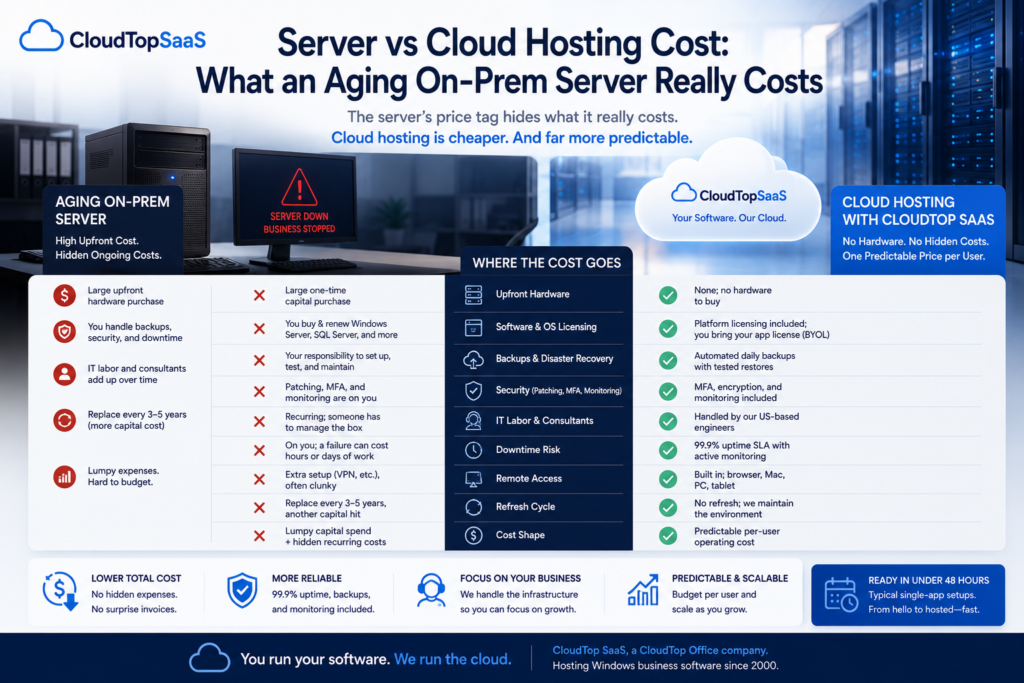
Server vs cloud hosting cost is rarely a fair fight on the surface, because the server’s price tag hides most of what it actually costs to run. A server looks like a one-time purchase. Hosting looks like a monthly bill. But once you add the backups, the patching, the IT hours, the downtime, and the replacements you will make in three to five years, the server’s real cost climbs well past its sticker price. For most small and mid-sized businesses running a Windows line-of-business app, hosting ends up cheaper and far more predictable. Here is the full breakdown, line by line, including the cases where keeping the server still wins.
Key takeaways
- The server’s purchase price is a small part. Backups, patching, IT labor, downtime, and the refresh cycle are the real costs.
- Hosting turns a lumpy capital purchase into a predictable per-user operating cost, with backups, security, and monitoring included.
- Server cost is easy to underestimate because most of it is hidden or spread across other budgets.
- Keeping the server can still win in a few cases, like recent hardware or a tiny single-user setup.
- CloudTop SaaS, a CloudTop Office company, prices per user, quoted per environment, with no platform fees, dressed up as growth pricing.
Server vs cloud hosting cost: which is cheaper?
Once you consider the full picture, hosting is usually cheaper and almost always more predictable. The mistake is comparing a server’s one-time price to a monthly hosting bill, as if the server were free to run after you buy it. It is not. A server carries recurring costs that rarely show up as a single line item: the licensing, the backups, the security work, the IT time, and the failure that eventually costs you a day of business. Hosting bundles most of that into one predictable number per user.
What goes into the server vs cloud hosting cost?
The core difference is capital cost versus operating cost. A server is a capital purchase: a big number upfront, then a series of smaller costs you stop noticing. Hosting is an operating cost: a steady per-user amount that already includes the pieces you would otherwise buy, run, and maintain yourself. The reason the two feel so different is that a server pushes most of its cost into the future and into other budgets, while hosting puts the whole cost in one place, on one bill.
The true cost of an aging on-prem server
A server is never just a box. To run one safely, you are also paying for the operating system and database licensing, a backup system you set up and test, security work like patching and monitoring, and the IT person or consultant who keeps it all running. Add the electricity, the cooling, and the space it takes up, then plan to replace the whole thing in three to five years. Most of these costs are easy to miss precisely because they are spread out. That is what makes a server look cheaper than it is.
What cloud hosting actually costs
Hosting is a per-user cost that already includes the work you would otherwise do yourself. With CloudTop SaaS, one predictable per-user price covers the Azure environment, automated daily backups, MFA and encryption, monitoring, and US-based engineers who operate it. In most cases, you bring your own application license (BYOL), and the provider supplies the underlying platform licensing. There is no hardware to buy, nothing to refresh in a few years, and no separate consultant bill. You trade a lumpy capital purchase and a pile of hidden costs for one number you can budget around.
Server vs cloud hosting cost: the line-by-line comparison
Here is where the money actually goes on each side. The figures depend on your setup, so this compares the cost categories rather than dollar amounts.
| Cost factor | Aging on-prem server | Cloud hosting |
|---|---|---|
| Upfront hardware | Large one-time capital purchase | None; no hardware to buy |
| Software and OS licensing | You buy and renew Windows Server, SQL Server, and more | Platform licensing included; you bring your app license (BYOL) |
| Backups and disaster recovery | Your responsibility to set up, test, and maintain | Automated daily backups with tested restores, included |
| Security | Patching, MFA, and monitoring are on you, ongoing | MFA, encryption, and monitoring included |
| IT labor and consultants | Recurring; someone has to manage the box | Handled by the provider’s US-based engineers |
| Downtime risk | On you; a failure can cost hours or days of work | 99.9% uptime SLA with active monitoring |
| Remote access | Extra setup (VPN and the like), often clunky | Built in; browser, Mac, PC, tablet |
| Refresh cycle | Replace every 3 to 5 years, another capital hit | No refresh; the provider maintains the environment |
| Cost shape | Lumpy capital spend plus hidden recurring costs | Predictable per-user operating cost |
The costs people forget on the server side
The line items above are the visible costs. The ones that sink a budget are the costs nobody puts on the spreadsheet. Downtime is the big one: when the server goes down, the whole team stops, and that lost time is a real cost even though no invoice shows it. Staff time is another: the hours your people or your consultant spend babysitting hardware instead of doing their jobs. Then there is the security incident you hope never happens, the slow drag of a machine that gets less reliable every year, and the opportunity cost of capital tied up in a depreciating box. The candid version of the server story is the one from our homepage: the app works, but the infrastructure around it quietly costs you more every year.
When keeping the server is actually cheaper
Hosting is not always the cheapest answer, and it would be dishonest to claim it is. Keeping the server can win when the hardware is recent and already paid for, so there is little cost left to avoid in the near term. It can win for a tiny single-user setup where the overhead of the server is genuinely small. And if you are mid-refresh with budget already committed, the timing may favor waiting. The honest test is simple: add up the full cost of running the server for the next few years, including the hidden items, and compare that to hosting. If the server number is small and stable, keep it. If it is large or lumpy, hosting usually wins.
What this means for software vendors
If you make the software, this cost math is what your customers weigh when their server ages out. A customer facing a server refresh is a customer weighing whether to stay on your product at all. Offering a hosted edition changes that conversation: instead of a capital purchase and another few years of managing hardware, your customer gets a predictable per-user subscription and you get a stickier, recurring relationship. You do not have to build the infrastructure to offer it. We host your app under your brand, and the cost story that once pushed customers to shop around now keeps them with you.
How CloudTop SaaS prices hosting
We price per user, quoted per environment, with no platform fees disguised as growth pricing and no starter tier built to upsell you. That one number includes the Azure environment, backups, MFA, monitoring, and US-based engineers. In most cases, you bring your own application license, and there is no lock-in, so the predictable cost does not come with a trap. On a discovery call, we will cost your specific setup honestly, including the cases where keeping your server makes more sense. CloudTop SaaS is a CloudTop Office company, and CloudTop Office has hosted Windows business software since 2000, with more than 500 businesses onboarded.
Frequently asked questions
Is cloud hosting cheaper than running my own server?
Usually, once you count the full cost. A server’s purchase price is only part of what it costs to run; backups, licensing, security, IT labor, downtime, and the three-to-five-year refresh add up. Hosting bundles most of that into one predictable per-user cost, which is cheaper for most small and mid-sized setups.
What hidden costs come with an on-prem server?
The ones people forget: IT labor and consultants, backup setup and testing, security patching and monitoring, downtime when it fails, electricity and cooling, and the capital hit to replace it every few years. Most of these are spread across other budgets, which is why a server looks cheaper than it is.
What’s included in the cloud hosting cost that a server doesn’t cover?
With CloudTop SaaS, the per-user cost includes the Azure environment, automated daily backups, MFA and encryption, monitoring, and US-based engineers who operate it. There is no separate hardware, refresh, or consultant bill to add on top.
How often do I need to replace a business server?
Most businesses replace a server every three to five years as it ages out of warranty and becomes unreliable. That refresh is a recurring capital cost, and it is one of the biggest line items that hosting removes entirely.
Is cloud hosting cost predictable month to month?
Yes. We quote a per-user cost per environment, so your bill scales with your team rather than surprising you. There are no platform fees disguised as growth pricing and no lock-in.
As a software vendor, how does hosting change my customers’ cost math?
It turns a capital purchase and years of hardware management into a predictable subscription. A customer facing a server refresh is a flight risk; a hosted edition of your product keeps them with you and gives you recurring revenue, without you building cloud infrastructure.
Want the real cost comparison for your setup?
Tell us what you run and how your server is set up, and we will cost hosting against your current server honestly, including whether keeping it makes more sense. Book a 15-minute consult to see how your software qualifies. Software vendor weighing a hosted edition for your customers? Ask us how to become a hosting partner.
CloudTop SaaS, a CloudTop Office company, cloud-hosts the Windows business software you already run on Microsoft Azure with Parallels RAS. US engineers, automated backups, predictable per-user pricing, no rebuild required. From hello to hosted in under 48 hours. For named-app hosting such as QuickBooks, Sage, Act!, and QuoteWerks, see our parent brand, CloudTop Office.