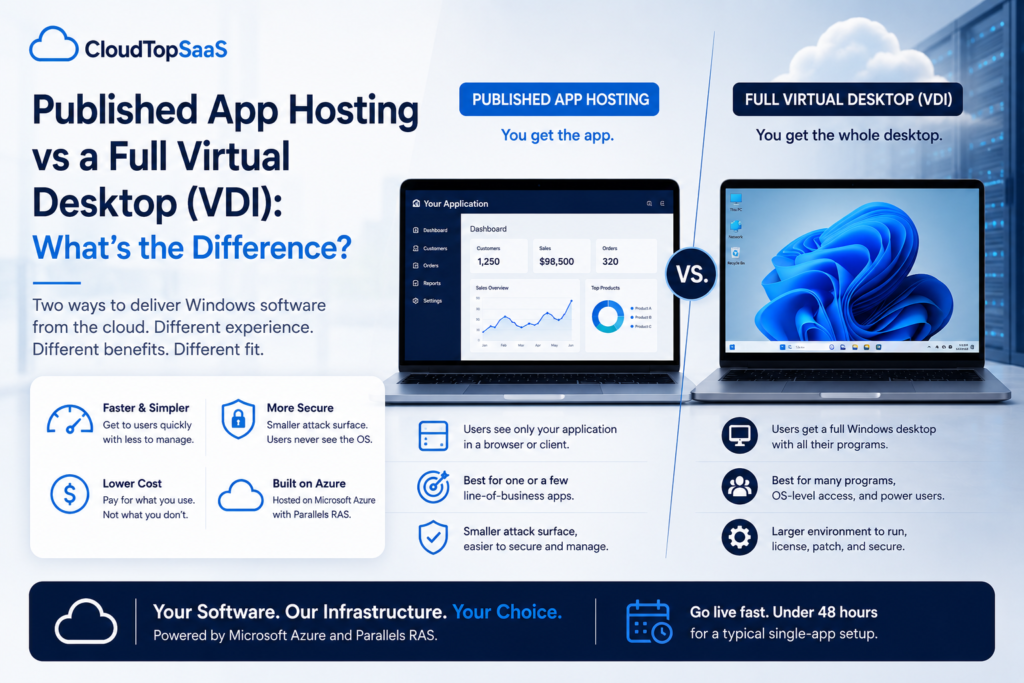
Published app hosting delivers a single application to your users in a browser or client, while a full virtual desktop (VDI) hands them an entire Windows desktop in the cloud. The short version: if your team needs one line-of-business app or a few, published app hosting is faster, cheaper, and simpler. If they need a whole managed desktop with many unrelated programs, VDI earns its keep. Most small and mid-sized businesses running a Windows line-of-business app need the app, not the desktop, which is why published app hosting is our default. Here is how the two compare and when each one wins.
Key takeaways
- Published app hosting shows users just your application. VDI gives them a whole cloud desktop, with the app inside it.
- For one or a few line-of-business apps, published apps are faster, cheaper, and simpler to run.
- Published apps have a smaller attack surface because users never touch the operating system or desktop.
- A full desktop still makes sense when people need many unrelated programs or full OS access.
- CloudTop SaaS, a CloudTop Office company, delivers published app hosting on Azure with Parallels RAS, MFA, and daily backups.
Published app hosting or a full virtual desktop: which should you use?
Start with what your people actually need to open. If the answer is one business application, or a small set of them, published app hosting gives you exactly that with less to run and less to secure. If the answer is a full working desktop with many programs, file management, and OS-level access, a virtual desktop fits better. The rest of this piece is a detail on top of that one distinction.
What is published app hosting?
Published app hosting means a single application is delivered to users on its own, without the desktop around it. Users see your software in a browser or client, not the operating system underneath. The app runs on a server in the cloud, and only the app appears on screen. That is the model CloudTop SaaS uses: your Windows business software, published and accessed from a browser, Mac, PC, or tablet, with nothing else in the way.
What is a full virtual desktop (VDI)?
A full virtual desktop, often called VDI (virtual desktop infrastructure), gives each user an entire Windows desktop that runs in the cloud and streams to their device. They sign in and get a complete desktop: the Start menu, file explorer, multiple programs, and the app they came for. When a provider builds, secures, and manages those desktops for you, it is usually called DaaS (Desktop as a Service). VDI is powerful, and it is also more to run, license, and lock down than a single published app.
Published app hosting vs VDI: the comparison
Here is how the two approaches stack up across the factors that drive the decision.
| Factor | Published app hosting | Full virtual desktop (VDI) |
|---|---|---|
| What the user sees | Just your application, in a browser or client | A whole Windows desktop, with the app inside it |
| Attack surface | Smaller; users never touch the OS or desktop | Larger; a full OS to secure, patch, and lock down |
| Speed and performance | Lighter; only the app streams | Heavier; a whole desktop session per user |
| Cost | Lower; less to license, run, and manage | Higher; more compute and management per user |
| Setup and management | Simpler; publish the app, provision users | More involved; build, secure, and maintain desktop images |
| Device support | Browser, Mac, PC, tablet | Browser, Mac, PC, tablet, with a heavier session |
| Best for | One or a few line-of-business apps | A full managed desktop with many unrelated programs |
Why published apps are usually faster and cheaper
Published apps carry less weight. A virtual desktop runs a full operating system for every user, which means more compute, more storage, and more to license and patch. A published app runs the software and nothing else, so each session is lighter, and the provider has less to manage. That shows up in three places: performance feels snappier because there is no desktop to load, cost is lower because you are not paying for a full OS per seat, and management is simpler because there are no desktop images to build and maintain. For a company that just needs its business app in the cloud, paying for a whole desktop is paying for parts you never use.
Is published app hosting more secure than VDI?
Published apps have a smaller attack surface, which is a real security advantage, though neither approach is secure by itself. When users only ever see one application, they never touch the desktop, the file system, or the operating system, so there is less for an attacker to reach and less for you to lock down. A full desktop exposes more: browsers, file storage, and OS-level settings that all need to be secured and patched. Security still depends on the controls around either model. At CloudTop SaaS, that means MFA enforced on every login, encryption in transit and at rest, and daily backups, on top of the smaller footprint published apps already give you.
When a full desktop still makes sense
Published apps are not always the answer, and it would not be honest to pretend otherwise. A full virtual desktop is the better fit when people need many unrelated programs in one place, when they need file management and OS-level access as part of the job, or when the use case is development, administration, or a locked-down standard desktop for a whole workforce. If your team lives across a dozen tools all day, a managed desktop can be simpler than publishing each one. The point is to match the model to the work, not to force one on the other.
What this means for software vendors
If you make the software, publishing your app beats handing customers a desktop. A published app is the cleaner experience: your customer signs in and sees your product, branded, with none of the confusion of a Windows desktop wrapped around it. It is lighter to run, so the economics of a hosted edition work better, and it keeps the focus on your software instead of the OS. When we host a vendor’s app under a white-label or co-branded workspace, published app hosting is what makes it read as the vendor’s product rather than a generic cloud desktop.
How CloudTop SaaS delivers published app hosting
We publish your existing Windows application on Microsoft Azure using Parallels RAS, so users see the app, not the OS. Environments run in U.S. Azure regions with MFA on every login, encryption in transit and at rest, automated daily backups, and a 99.9% uptime SLA. US-based engineers operate and monitor the environment, and you keep your data with no lock-in. For a typical single-app setup, we are live in under 48 hours, with complex multi-database or custom-integration cases taking longer. CloudTop SaaS is a CloudTop Office company, and CloudTop Office has hosted Windows business software since 2000, with more than 500 businesses onboarded.
Glossary
Frequently asked questions
What’s the difference between published app hosting and VDI?
Published app hosting delivers a single application to users, so they see just your software in a browser or client. VDI gives users a full Windows desktop in the cloud, with the app running inside it. One shows the app; the other shows a whole desktop.
Is published app hosting more secure than a full virtual desktop?
It has a smaller attack surface, which is a real advantage, because users never touch the OS, the file system, or the desktop. Neither model is secure on its own, though. Security still depends on controls like MFA, encryption, and backups around whichever approach you use.
Is published app hosting cheaper than VDI?
Usually, yes. A published app runs the software and nothing else, so there is no full operating system to license, run, and patch per user. That makes each session lighter and the overall cost lower than a full virtual desktop for the same app.
Can I run my Windows app in a browser with published app hosting?
Yes. The application is published so users can reach it from a browser or a lightweight client. They see your software directly, without a Windows desktop wrapped around it.
Does published app hosting work on Mac, PC, and tablets?
Yes. A published app runs on a Mac, a PC, a tablet, or in a browser, because the software runs in the cloud and only the app streams to the device. The device just needs a browser or the client.
As a software vendor, should I publish my app or give customers a full desktop?
Publish the app. It reads as your product rather than a generic cloud desktop; it is lighter and cheaper to run, and it keeps the experience branded. A full desktop only makes sense if your customers genuinely need many programs and OS-level access in one place.
Want your software delivered as a published app?
Tell us what you run and we will scope the published-app path, or tell you honestly if a full desktop fits your case better. Book a 15-minute consult to see how your software qualifies. Software vendor planning a hosted edition? Ask us how to become a hosting partner.
CloudTop SaaS, a CloudTop Office company, cloud-hosts the Windows business software you already run on Microsoft Azure with Parallels RAS. Published apps, US engineers, automated backups, no rebuild required. From hello to hosted in under 48 hours. For named-app hosting such as QuickBooks, Sage, Act!, and QuoteWerks, see our parent brand, CloudTop Office.