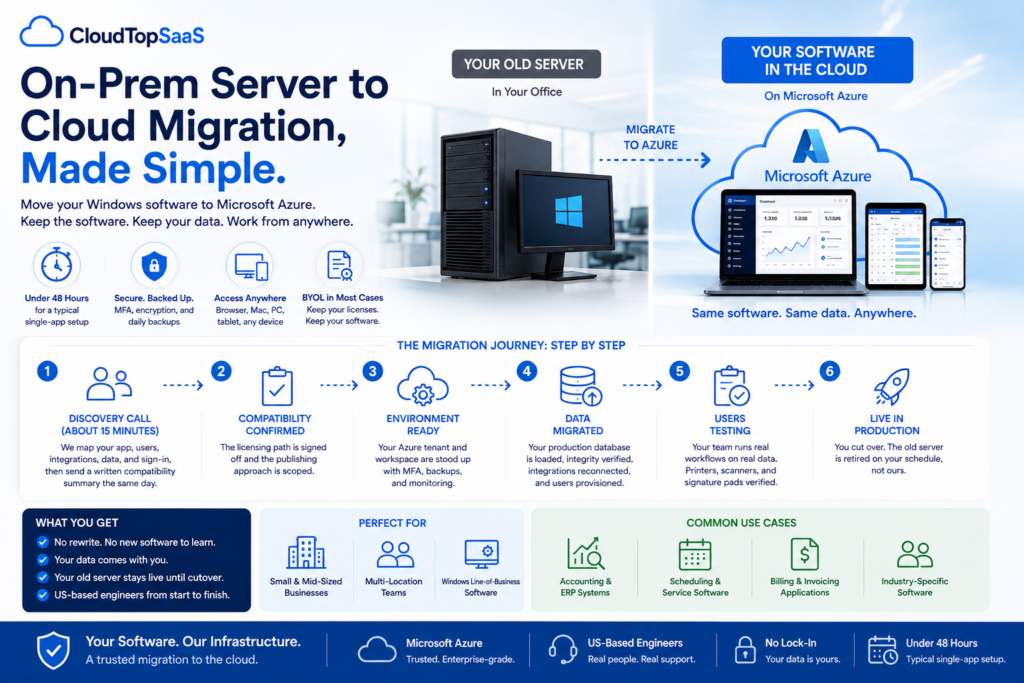
An on-prem server to cloud migration moves the Windows software running on the server in your office into a hosted environment on Microsoft Azure, so your team reaches it from anywhere. For a single app, the whole move usually takes under 48 hours, and your old server keeps running until you are ready to switch off. Your software does not change. Your data comes with you. This guide walks through exactly what happens, what to prepare, and how long each part takes, so you know what you are signing up for before you book a call.
Key takeaways
- An on-prem server to cloud migration moves your existing Windows app and its database to Azure, without changing the software.
- A typical single-app move takes under 48 hours; complex multi-database or custom-integration setups take longer.
- Your old server stays live until cutover, so you are not flying without a net during the switch.
- Your data comes with you, integrity is verified, and in most cases you keep your licenses (BYOL).
- CloudTop SaaS, a CloudTop Office company, confirms fit on a 15-minute call and sends a written summary the same day, before any deposit.
How does on-prem server to cloud migration work?
It follows a set path: a discovery call, a compatibility check, an Azure environment build, a data move, testing, and go-live. We deploy your existing Windows app into a secure Azure environment and publish it so your team signs in from a browser or client on any device. The software works the way it does today. What changes is that the server in your office stops being the thing your whole business depends on.
What does on-prem server to cloud migration involve?
Three things move: your application, its database, and your users. Your software does not get rewritten or replaced. We stand up a hardened Azure environment, load your production database, reconnect your integrations, and provision your people with the right roles. The old server keeps running the whole time, so nothing goes dark during the move. Once you have tested and you are happy, you retire the old machine on your own schedule.
The migration, step by step
Here is the typical single-app, single-database timeline. Complex setups take longer, and we tell you which one you are on during the discovery call.
Discovery call (about 15 minutes)
We map your app, users, integrations, data, and sign-in, then send a written compatibility summary the same day.
Compatibility confirmed
The licensing path is signed off and the publishing approach is scoped, so there are no surprises later.
Environment ready
Your Azure tenant and workspace are stood up with MFA enforced, daily backups live, and monitoring on.
Data migrated
Your production database is loaded, integrity verified, integrations reconnected, and users provisioned with roles.
Users testing
Your team runs real workflows on real data, with printers, scanners, and signature pads all verified.
Live in production
You cut over, and the old server is retired on your schedule, not ours.
How to prepare for the migration
You do not need to do much, but a little prep makes the discovery call faster and the move smoother. Tick off what you can before we talk.
How long does an on-prem to cloud migration take?
For a typical single app with a single database, under 48 hours from the discovery call to a live environment. That is the common case, not a marketing number. What stretches it is real complexity: multiple databases that talk to each other, custom-coded integrations, or licensing that needs coordination with your software vendor. If your setup is one of those, we tell you the realistic timeline on the call, before you commit to anything.
Will I lose data or have downtime during the move?
No, and that is by design. Your old server stays live and in use during the migration, so your business keeps running while we build and load the new environment. We verify the data’s integrity after it moves, and you test real workflows on real data before anything changes for your team. You only cut over once you are satisfied, and you retire the old server on your schedule. Nothing gets deleted out from under you.
What about my licenses and software vendor?
In most cases you bring your own license (BYOL) and keep the software you already paid for. Some software vendors require a signed hosting addendum to run their product in a third-party cloud, and many require nothing at all. We coordinate that path with the vendor as part of the migration, so you are not left reading a license agreement on your own. Licensing rarely blocks a move; it just occasionally adds a step.
For software vendors: migrating your customers to a hosted edition
If you make the software, the same process migrates your customers to a hosted edition of your product, under your brand. We handle the discovery, the environment, the data move, and the provisioning, while your customers stay yours and your name stays on the sign-in. It is a white-glove migration: your customer gets off their old server, you get a cloud offering without building the infrastructure, and the relationship never leaves your hands. For most single-app customers, the same under-48-hour timeline applies.
How CloudTop SaaS runs the migration
US-based engineers run the whole thing, and the same people who scope your migration are the ones who answer your tickets afterward. We confirm fit on a 15-minute call, send a written compatibility summary the same day, and tell you on day one if something will not work, before any deposit. Environments run on Azure with MFA, encryption, and automated daily backups, and there is no lock-in: you own your data and can leave with it. CloudTop SaaS is a CloudTop Office company, and CloudTop Office has hosted Windows business software since 2000, with more than 500 businesses onboarded, so this is a path we have run many times.
Frequently asked questions
How does on-prem server to cloud migration work?
It runs through a set path: a discovery call, a compatibility check, an Azure environment build, a data move, testing, and go-live. Your existing Windows app and its database move to the cloud, the software stays the same, and your old server keeps running until you cut over.
How long does it take to move a server to the cloud?
For a typical single-app, single-database setup, under 48 hours from the discovery call to a live environment. Complex setups with multiple databases, custom integrations, or vendor-licensing steps take longer, and we tell you the realistic timeline upfront.
Will I have downtime or lose data during the migration?
No. Your old server stays live during the move, so your business keeps running. We verify data integrity after the move, you test on real data before cutover, and you retire the old server on your own schedule.
Do I need to replace or rewrite my software to migrate?
No. Your existing Windows software moves as-is. Migration means changing where the software runs, not the software itself, so there is no rewrite and no new product to learn.
What happens to my old server after the move?
You retire it on your schedule, once you have tested and you are satisfied. It stays live through the migration as your safety net, and nothing is removed until you say so.
As a software vendor, how do you migrate my customers to a hosted edition?
We run the same migration under your brand: discovery, environment, data move, and provisioning, while your customers and the relationship stay yours. It gives you a cloud offering without building the infrastructure, usually on the same under-48-hour timeline for a single app.
Ready to get off the server in the closet?
Tell us what you run and how your team is set up, and we will scope the migration and tell you honestly what it takes, in writing, the same day. Book a 15-minute consult to see how your software qualifies. Software vendor moving customers off their servers? Ask us how to become a hosting partner.
CloudTop SaaS, a CloudTop Office company, cloud-hosts the Windows business software you already run on Microsoft Azure with Parallels RAS. US engineers, automated backups, no rebuild required. From hello to hosted in under 48 hours. For named-app hosting such as QuickBooks, Sage, Act!, and QuoteWerks, see our parent brand, CloudTop Office.