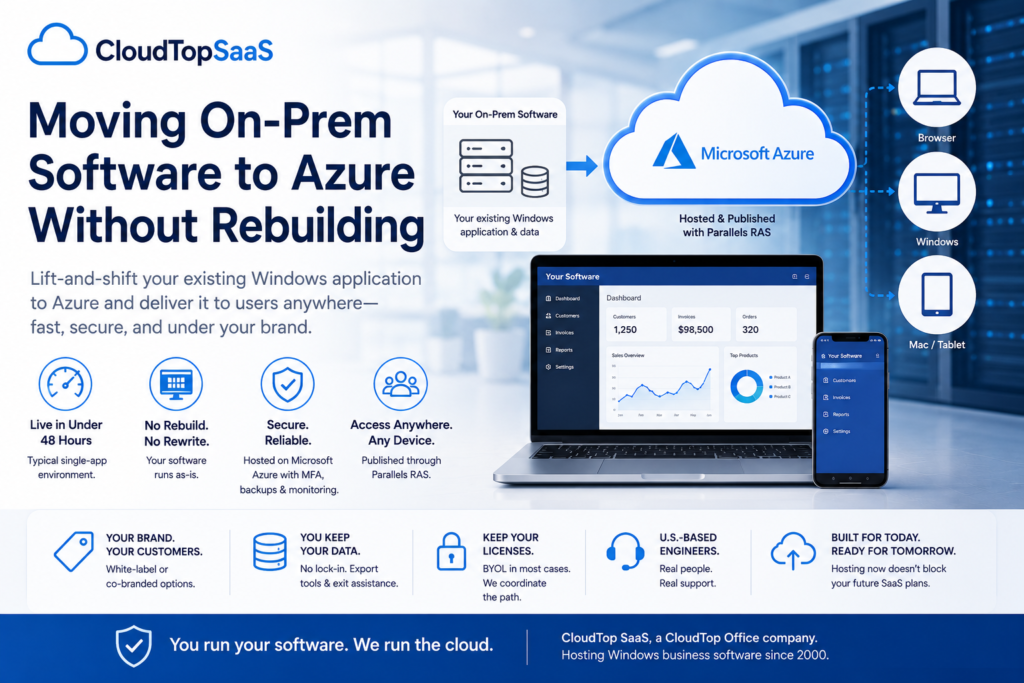
Yes, you can move on-prem software to Azure without rebuilding it. The method is lift-and-shift hosting: we deploy your existing Windows application into a hardened Azure tenant and publish it through Parallels RAS, so your team reaches it from a browser or client on any device. You skip the rewrite and the months of Azure engineering. An on-prem to Azure migration handled this way goes live in under 48 hours for a typical single-app setup, and your software works the way it does now. CloudTop SaaS, a CloudTop Office company, has hosted Windows business software since 2000.
Key takeaways
- Lift-and-shift means hosting your current Windows software on Azure as-is, with no code rewrite.
- Parallels RAS publishes the app to any browser or client, so users see your software, not a virtual desktop.
- A typical single-app on-prem to Azure migration goes live in under 48 hours. Multi-database or custom-integration setups take longer, and we say so on the discovery call.
- You keep your data and your licenses (BYOL in most cases), and there is no lock-in.
- Hosting now does not block a future move to true SaaS. It buys you time and a working remote setup in the meantime.
What does “move to Azure without rebuilding” mean?
It means running your existing Windows application on Azure as it is, instead of recoding it for the cloud. Two terms do the work here.
Lift-and-shift moves the software you run today onto cloud infrastructure without changing the code. The application keeps its features, its data structure, and its behavior. Your staff logs into the same program they used yesterday, now running on Azure instead of the server in your office.
Published-app hosting means users see your application in a browser or client, not a full Windows desktop. We publish the app through Parallels RAS, so a person opens your software directly, and the operating system underneath stays out of view. That keeps the setup lighter than a full virtual desktop, with a smaller attack surface.
Can you move on-prem software to Azure without rebuilding it?
Yes, in most cases. If your software runs on Windows and supports multiple users over a network, it can be hosted on Azure and published through Parallels RAS without a rewrite.
The setup fits when:
- It is a Windows desktop or client-server application, the kind installed on a server and accessed from staff PCs.
- Several people use it over your network today.
- Its data lives in a database you can export and reload (SQL Server, Firebird, Pervasive, and similar).
- You hold valid licenses, or your vendor allows hosting. We coordinate that path with the software maker.
It gets more involved when the app has heavy custom integrations, several linked databases, or a vendor license that needs a hosting addendum. None of that stops the move. It changes the timeline, and we map it on the discovery call before quoting anything. Run the quick check below to see where your software lands.
Will your software qualify for hosting?
Answer four questions for a directional read. This is not a quote. 1. Does your software run on Windows? Yes No2. Do several people use it over your network? Yes No, single user3. Is its data in a database you can export (SQL Server, Firebird, Pervasive)? Yes, Not sure, No. 4. Do you hold valid licenses, or can your vendor allow hosting? Yes, Not sure, No. Check my fit
How does an on-prem to Azure migration work, step by step?
An on-prem to Azure migration runs through six stages, from a 15-minute discovery call to going live. For a single app with one database, the whole sequence fits inside 48 hours. Here is how the move works.
- 15 min Discovery call. We map your app, users, integrations, data, and sign-in. You get a written compatibility summary the same day.
- ~Hour 4: Compatibility confirmed. We sign off on the licensing path and scope of how the app publishes through RAS.
- ~Hour 12: Environment ready. Your Azure tenant and RAS workspace go up. We enforce MFA, switch on daily backups, and start monitoring.
- ~Hour 24: Data migrated. We load your production database, verify its integrity, reconnect integrations, and provision users with roles.
- ~Hour 36: Users testing. Your team runs real workflows on real data while we watch. We confirm printing, scanning, signature pads, and integrations.
- ~Hour 48: Live in production. You move over on your schedule. The old environment retires when you say so.
Those stages and that 48-hour figure describe the typical single-app, single-database case. The exact steps and the timeline shift with the size of your environment and what your software needs. More users, more databases, or heavier integrations push the schedule out, and a vendor that has to approve hosting adds time too. We tell you which case you are in during discovery, not after you have signed. The environment runs on Azure in Microsoft’s trusted-cloud regions, East US or Central US by default, with data residency on request.
Lift-and-shift vs rebuild as SaaS: which should you choose?
Choose lift-and-shift when your software still does the job, and the pain is the infrastructure around it. Choose a rebuild as SaaS when the application itself is holding the business back and a modern replacement exists. For most firms with a working line-of-business app, hosting first is the lower-risk move.
| Factor | Lift-and-shift (host it) | Rebuild as SaaS (replace it) |
|---|---|---|
| Timeline | Under 48 hours for a single app | Months to years |
| Up-front cost | Low, no hardware to buy | High development, or a paid product migration |
| Risk to daily operations | Low, same app and same data | Higher, new system, and retraining |
| Code changes | None | A rewrite, or switching to a different product |
| Keeps your current features | Yes | Only what the new product offers |
| Best when | The app works; the infrastructure is the problem | The app itself is holding the business back |
Sometimes a full move to a modern SaaS product is the better long-term call. When that day comes, we will help with the export and the handoff. Hosting your current app now does not trap you. It keeps the business running while you decide on your timeline rather than a vendor’s.
Is hosting on Azure secure, and what about compliance?
Your environment runs on Microsoft Azure, which holds independent attestations including SOC 1, SOC 2, ISO 27001, and ISO 27017/27018. CloudTop SaaS inherits those Azure attestations and configures the environment for line-of-business workloads. Here is how we secure it.
On top of that, every environment we run includes:
- MFA on every user, every login.
- Encryption in transit (TLS 1.2 or higher) and at rest, with no plaintext database.
- Automated daily backups with rolling retention and tested point-in-time restore.
- A 99.9% uptime SLA, backed by Azure availability sets and active monitoring.
We do not hold our own HIPAA or PCI-DSS certification, and we will not claim one. For workloads under those rules, such as a dental or medical practice, we architect against the relevant controls and walk you through the shared-responsibility model so you know which obligations sit with you. And the data is yours. We provide export tools and contractual exit help, so there is no lock-in.
What an on-prem to Azure move looks like in practice
The scenario below is illustrative, not a real client. A 40-user HVAC contractor runs a field service application on one in-office server.
The problem. The server is six years old. Backups run to a USB drive nobody checks. Field techs cannot reach the system from a job site, so they phone the office to pull up customer history. The IT contractor who set it up has gone quiet.
The solution. On a Monday discovery call, we map the application, its database, and the integrations. By midweek, we publish the app via Parallels RAS on an Azure tenant in East US, enforce MFA, and enable daily backups. Techs sign in from a tablet in the field, and the office staff from their browsers.
The outcome. Inside 48 hours, the contractor has anywhere access, backups that run on schedule, and a U.S.-based engineer to call. The six-year-old server has retired. Nothing about the application changed for the people using it. See the software we host across field service, manufacturing ERP, insurance, property management, and auto.
Run a software company instead of using one? If your customers want a cloud version of your product, we host it under your brand. That is our white-label service for software vendors.
Frequently asked questions
Can I move my on-prem software to Azure without changing how my team uses it?
Yes. With lift-and-shift hosting, your staff uses the same application the same way. It runs on Azure and opens in a browser or client via Parallels RAS, so the workflows and data remain the same.
How long does an on-prem to Azure migration take?
A typical single-app, single-database migration goes live in under 48 hours. Setups with several linked databases, custom integrations, or vendor licensing that need approval take longer. We tell you which case applies on the discovery call.
Do I need new software licenses?
In most cases, you bring your own licenses (BYOL). Some vendors require a hosting addendum, and some do not. We coordinate the licensing path with your software maker before going live.
Is my data safe, and can I get it back if I leave?
Your environment runs on Microsoft Azure with MFA, encryption in transit and at rest, and automated daily backups. The data is yours. We provide export tools and contractual exit assistance, so there is no lock-in.
What if I want to move to a true SaaS product later?
Hosting your current app does not block that. It keeps you running now and buys time to decide. When you are ready to switch, we help with the data export and the handoff.
Which kinds of software can you host?
Almost any Windows shared or multi-user business application: field service, manufacturing ERP, insurance agency management, property management, legal, dental, and auto shop. If it runs on Windows and people share it over a network, we can host it. Run QuickBooks Desktop or Sage? Those have dedicated hosting through our parent brand, CloudTop Office.
See if your software qualifies
Book a 15-min consult, and we will confirm whether your software qualifies and what a realistic timeline looks like. You will talk to an engineer, not a sales script.
CloudTop SaaS, a CloudTop Office company, cloud-hosts the Windows business software you already run on Microsoft Azure with Parallels RAS. U.S. engineers, automated backups, no rebuild required. From hello to hosted in under 48 hours. Read more on the blog.