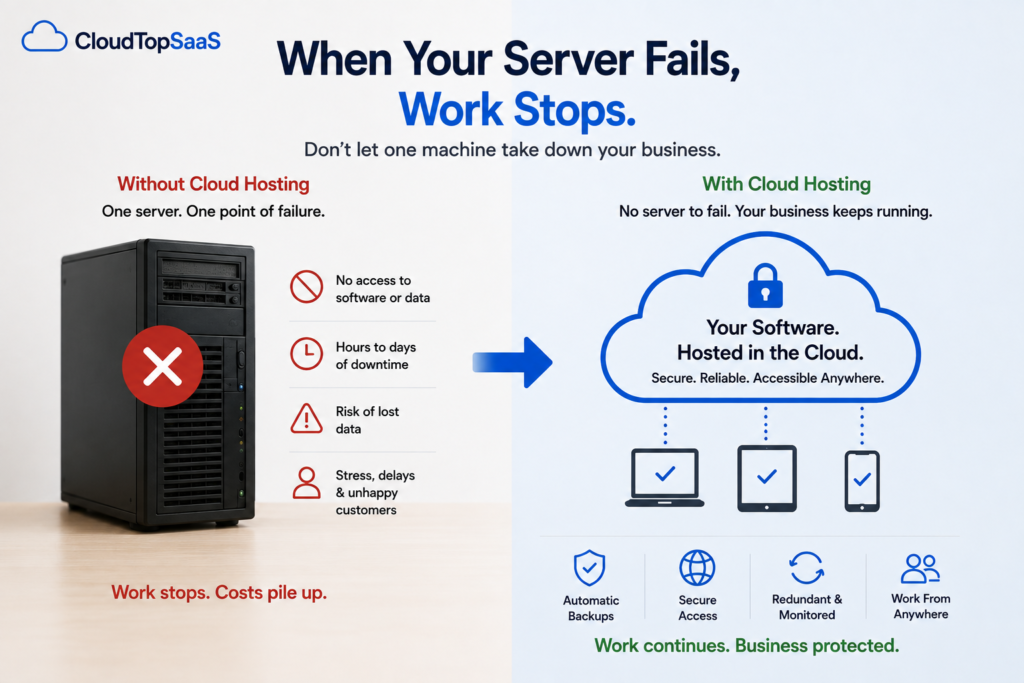
What happens if my server fails? The blunt answer: work stops. Nobody can open the software, nobody can reach the data, and your whole team sits idle until someone fixes it. If your backups are solid, you lose hours. If they are not, you can lose days, or the data itself. That is the risk sitting in your office closet right now, on one machine with no backup singer waiting in the wings. The good news is that a server failure does not have to be a crisis. This guide walks through what actually happens, what it costs, and how to turn a dead server into a non-event.
The short version
- When your server fails, your team loses access to the software and the data at the same time.
- Recovery ranges from hours to days, depending entirely on your backups and spare hardware.
- If backups were never tested, you can lose data for good.
- Small businesses are hit hardest because there is no IT team or spare server standing by.
- Hosting your software in the cloud removes the single machine that can take the whole business down.
What actually happens when your server fails?
Everything that lives on that server goes dark at once. Your team cannot open the application, the shared files are unreachable, and the database behind your daily work is offline. Work does not slow down; it stops. Phones still ring, customers still expect answers, and your staff are standing around unable to do the thing they came in to do. Then the scramble starts: someone calls the consultant, someone checks whether there is a backup, and everyone waits. The failure is one event, but it freezes the whole business until it is resolved.
How much does server downtime really cost?
More than the repair bill. The obvious cost is the hardware fix, but that is the small part. The real cost is a whole team paid to do nothing, work that piles up and has to be caught up later, customers kept waiting, and the stress of not knowing when it ends. A single bad day can cost far more than the server did. The exact number depends on your business, but for most small companies, a full day of downtime is expensive enough that preventing it pays for itself.
Could you lose your data for good?
Yes, and this is the part owners underestimate. A server failure only costs you time if your backups work. If your backup is a script nobody has checked, a drive that stopped copying months ago, or a process you have never actually restored from, the failure is not a delay, it is a loss. Years of customer records, history, and files can be gone. The one machine holding everything, with no tested copy, is the real exposure, not the hardware itself.
How long does it take to recover from a server crash?
Honestly, it varies, and “we’ll just fix it” is usually optimistic. If a part failed and you have a spare and a good backup, you might be back in hours. If you need to order hardware, rebuild the machine, reinstall the software, and restore the data, you are looking at days. And if the backup turns out to be broken, recovery is not measured in time at all, because some of it is not coming back. The uncomfortable truth is that most small businesses do not know their real recovery time until the day they need it.
Why small businesses get hit hardest
A large company has an IT team, spare hardware, and redundancy, so a failed server is an inconvenience. A small business usually has one server, one consultant, and no backup machine, so the same failure is a shutdown. The very things that make a small business lean, no spare parts, no full-time IT, are what turn a hardware fault into a business emergency. Being small is exactly why the single-server setup is so risky.
How to make a server failure a non-event
The real fix is to stop having a single box that can take the business down. When you host your software in the cloud, there is no server in your closet to fail. Your Windows app runs in a managed environment on Microsoft Azure, with automated daily backups that are actually tested, redundancy built in, and recovery handled by the provider instead of you. A hardware fault stops being your problem, because there is no hardware of yours to fault. Your team keeps working from anywhere, and a failure that would have shut you down becomes something you never even notice. For how that move works, see on-prem server to cloud migration.
What if you’re not ready to move yet?
If moving is not on the table this month, reduce the risk in the meantime, but be clear-eyed that these steps lower the odds, they do not remove the single point of failure. Actually test a restore from your backup, so you know it works before you need it. Write down how the server is set up, so you are not dependent on one person’s memory. Make sure more than one person can reach the backups and the vendor. These are worth doing today. Just remember that as long as everything rides on one machine, the risk is still there. The only way to remove it is to stop depending on that machine. The signs it’s time to replace your server can help you judge how urgent this is.
For software vendors: what a customer’s server failure means for you
If you make the software, a customer’s server crash is a moment of truth for your product. When their system goes down and recovery drags on, they start asking whether there is a cloud option, and if you do not have one, they go looking. Offering a hosted edition of your software under your brand removes that single point of failure for your customers and keeps the relationship with you. We host it and handle the infrastructure. More on that in offering a hosted version of your software.
How CloudTop SaaS removes the single point of failure
We take the Windows software you already run and host it on Microsoft Azure, so there is no server in your office left to fail. Every environment gets automated daily backups with tested restores, redundancy, MFA, and encryption, monitored by US-based engineers. Your data stays yours, with no lock-in, and a typical single-app setup is live in under 48 hours, with complex cases taking longer. The point is simple: a dead server can only stop your business if your business depends on one. CloudTop SaaS is a CloudTop Office company, and CloudTop Office has hosted Windows business software since 2000, with more than 500 businesses onboarded.
Frequently asked questions
What happens if my server fails?
Your team loses access to the software and the data at the same time, and work stops until it is fixed. If your backups are solid, you lose hours. If they are not, you can lose days, or the data itself. It freezes the whole business until it is resolved.
How long does it take to recover from a server crash?
It varies a lot. With a spare part and a good backup, hours. If you have to order hardware, rebuild, and restore, days. If the backup is broken, some data may not come back at all. Most small businesses do not know their real recovery time until they need it.
Will I lose my data if my server dies?
Only if your backups fail. A server failure costs you time if your backups work, and data if they do not. An untested backup is the real exposure, which is why tested, automated backups matter more than the hardware.
How much does server downtime cost a small business?
More than the repair. The bigger costs are a team paid to do nothing, work that piles up, and customers kept waiting. For most small businesses, a single full day of downtime is expensive enough that preventing it pays for itself.
How do I prevent a server failure from stopping my business?
Remove the single machine everything depends on. Hosting your software in the cloud means there is no office server to fail, with tested backups, redundancy, and recovery handled for you. In the meantime, test your backups and document your setup to reduce the risk.
Do I have to replace my software to get off my server?
No. Your existing Windows software is hosted as-is, so you keep the tool you use and the data inside it. Getting off the server does not mean replacing the software.
Don’t wait for the server to decide for you
The best time to deal with a server failure is before it happens. Tell us what you run, and we will show you what hosting it would look like and cost, in writing, the same day, so a dead server never gets a vote in how your week goes. Book a 15-minute consult to see how your software qualifies. For the bigger picture, start with our guide to cloud hosting for small business.
CloudTop SaaS, a CloudTop Office company, cloud-hosts the Windows business software you already run on Microsoft Azure with Parallels RAS. US engineers, automated backups, no rebuild required. From hello to hosted in under 48 hours. For named-app hosting such as QuickBooks, Sage, Act!, and QuoteWerks, see our parent brand, CloudTop Office.