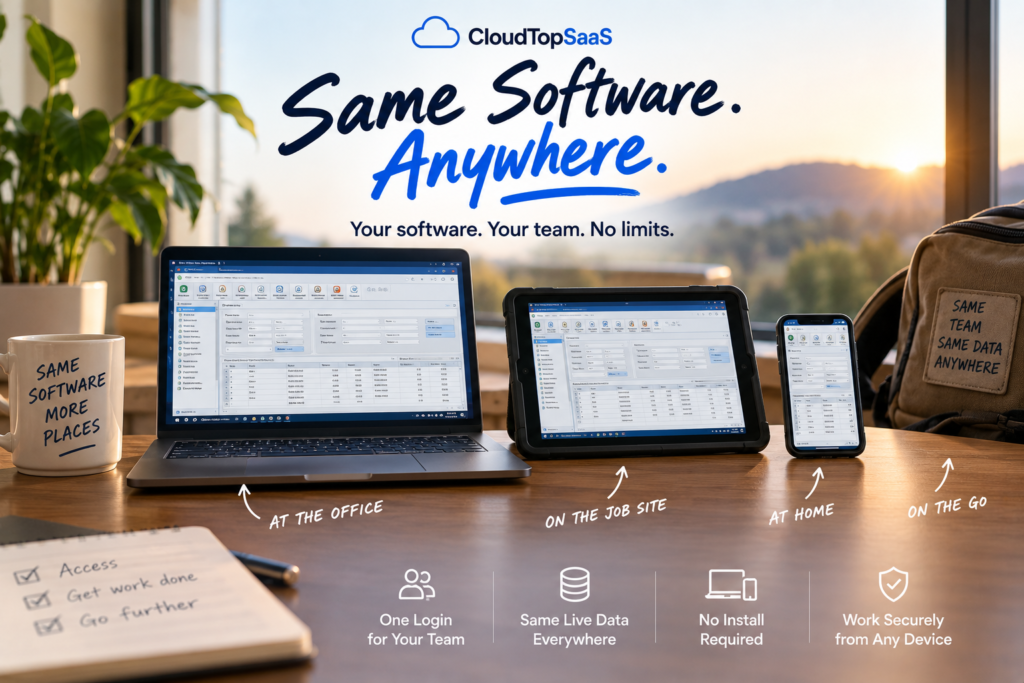
Using your software from any device looks like this: you open the same program you have always used, except now it runs in the cloud, so you reach it from your office PC, a tablet on a job site, your laptop at home, or your phone on the couch, all with one login and the same live data. Nothing is installed, nothing has to sync, and no computer has to stay on at the office. To show what that actually feels like, here is one ordinary day for a small business team whose Windows software is hosted in the cloud. The details are illustrative, but the experience is the real thing.
The short version
- It’s your real software, not a stripped-down app, running in the cloud.
- One login gets you in from a PC, Mac, tablet, or phone.
- Everyone works from the same live data, no syncing and no version confusion.
- Printing, scanning, and signature pads work from any location.
- No server to keep running, no VPN, and no driving back to the office.
What does using your software from any device actually look like?
It looks exactly like using your software today, minus the part where you have to be in the office to do it. You sign in, your application opens, and you work. The difference is where you can be when you do it. Because the software runs in the cloud and not on a machine in the building, the same login works from a desk, a truck, a kitchen table, or a customer’s front step. The day below walks through that, hour by hour.
[Image: the same application open on a laptop, a tablet, and a phone side by side. Alt: “Using your software from any device: the same app on a laptop, tablet, and phone.”]
A day in the cloud, hour by hour
Here is one day for a small business team running its Windows software in the cloud. It is an example, not a specific customer, but every step is something hosting makes ordinary.
Office desk, on the PC
The day starts the usual way. Sign in, the same application opens, and the morning’s work is right where it was left.
Job site, on a tablet
Out in the field, a tech pulls up a customer record on a tablet, updates it on the spot, and the office sees the change right away.
Home or a café, in a browser
Over lunch, someone finishes a task from a laptop in a browser. No VPN, no waiting, the same live data as everyone else.
Second location, on any PC
At a branch across town, a staff member signs in on a different computer, and everything is right there. Nothing to install.
Customer’s door, tablet and signature pad
Wrapping up a visit, the tech captures a signature on a pad and prints a receipt, from the same hosted app.
On the couch, on a phone
A quick check on a phone confirms the day’s numbers, and that is it. No one drove back to the office to close out.
It’s your real software, not a stripped-down version
The most common surprise is how normal it feels. This is not a cut-down mobile version of your software with half the features missing. It is your actual Windows application, published so it runs in the cloud, with everything it does at your desk. The screens are the same, the reports are the same, the workflow is the same. You are not learning a new tool; you are using the one you know, from more places. For how that publishing works, see published app hosting vs a full virtual desktop.
[Image: the hosted Windows application running full-screen in a browser. Alt: “A Windows business application running in a browser through cloud hosting.”]
Printing, scanning, and signature pads from any device
The everyday hardware keeps working, which is what makes a real day possible. Printing to a local printer, scanning a document, and capturing a signature on a pad are all standard, whether you are at the office, at home, or at a customer’s door. This is the part people assume they will lose when software moves to the cloud, and it is the part that usually just works. We confirm your exact devices on the discovery call so there are no surprises after go-live.
One login, one set of live data
Everyone in that day was looking at the same live data at the same time. There is no syncing, no emailing a file around, and no wondering whether the version on the tablet matches the one at the desk. Each person signs in with their own account and multi-factor sign-in, and they all share one source of truth. When the tech updates a record in the field, the office sees it immediately, because there is only one copy and it lives in the cloud.
What you stop dealing with
The quiet part of that day is everything that did not happen. Nobody babysat a server. Nobody fought a VPN. Nobody drove back to the office to finish something. Nobody worried about whether the backup ran. When you run your business software anywhere through hosting, the daily friction of keeping your own hardware alive just goes away, and the day is about the work instead of the setup.
Is it fast, and does it work on a Mac, tablet, or phone?
Yes on all counts. Because the software runs on servers in the cloud and only the screen streams to your device, a modest laptop, a Mac, a tablet, or a phone can all run a heavy Windows application smoothly. The work happens in the data center, not on your device, so performance does not depend on how new your hardware is. A regular home or mobile internet connection is enough for day-to-day use.
Is it secure on my personal device?
Cloud hosted software remote work is designed for exactly this. Every login uses multi-factor sign-in, data is encrypted in transit and at rest, and the software and data stay in the cloud rather than on your personal device, so nothing sensitive is left behind on a phone or a home laptop. Security is a shared responsibility, but a hosted setup is built to be used safely from personal devices. CloudTop SaaS runs environments in US Azure regions and inherits Azure’s SOC 2 and ISO attestations, configured for business workloads. We do not claim HIPAA or PCI certification on our own behalf; for regulated data, we walk through the shared-responsibility model with you.
For software vendors: the experience you can offer your customers
If you make the software, this day is the experience your customers want, and you can offer it under your brand without rebuilding your product. We host your existing Windows application, and your customers get the same any-device day, with your name on the sign-in. It is a way to hand them a modern, work-from-anywhere experience while you decide whether a full web rewrite is worth it later. More on that in offering a hosted version of your software.
How to get your own day in the cloud
Getting here is not a big project. We take the Windows software you already run and host it on Microsoft Azure, published so your team reaches it from any device, with MFA, encryption, and automated daily backups run by US-based engineers. In most cases you bring your own license, you own your data, and there is no lock-in. A typical single-app setup is live in under 48 hours, with complex cases taking longer, and we tell you which upfront. CloudTop SaaS is a CloudTop Office company, and CloudTop Office has hosted Windows business software since 2000, with more than 500 businesses onboarded. To go deeper, start with our guide to cloud hosting for small business, or see the ways to access your work software from anywhere.
Frequently asked questions
What does it look like to use my software from any device?
It looks like using your normal software, except you can do it from a PC, Mac, tablet, or phone, anywhere. You sign in and your real application opens, with the same screens and features as at your desk, all on one login and the same live data.
Do I need to install anything to use it?
Usually not. You reach the software from a browser, or a lightweight client, so a new computer just needs a login. There is nothing heavy to install on each device.
Does it work on a Mac, tablet, or phone?
Yes. The software runs in the cloud and only the screen streams to your device, so a Mac, a tablet, or a phone can all run a Windows application. The device just needs a browser or the client.
Will it be slow on a home or mobile connection?
For day-to-day use, no. The heavy work happens in the data center, not on your device, so a regular home or mobile connection is enough. Performance does not depend on how new your hardware is.
Can my whole team see the same data at the same time?
Yes. Everyone signs in to the same hosted app and the same live data, so a change made in the field shows up at the office right away. There is no syncing and no version confusion.
Is it secure to use on my personal device?
Yes. Every login uses MFA, data is encrypted, and the software and data stay in the cloud rather than on your device, so nothing sensitive is left behind on a personal phone or laptop.
Want a day like this for your team?
Tell us what you run, and we will show you what your own day in the cloud would look like and cost, in writing, the same day. Book a 15-minute consult to see how your software qualifies. Software vendor who wants to offer this experience to your customers? Ask us how to become a hosting partner.
CloudTop SaaS, a CloudTop Office company, cloud-hosts the Windows business software you already run on Microsoft Azure with Parallels RAS. US engineers, automated backups, no rebuild required. From hello to hosted in under 48 hours. For named-app hosting such as QuickBooks, Sage, Act!, and QuoteWerks, see our parent brand, CloudTop Office.