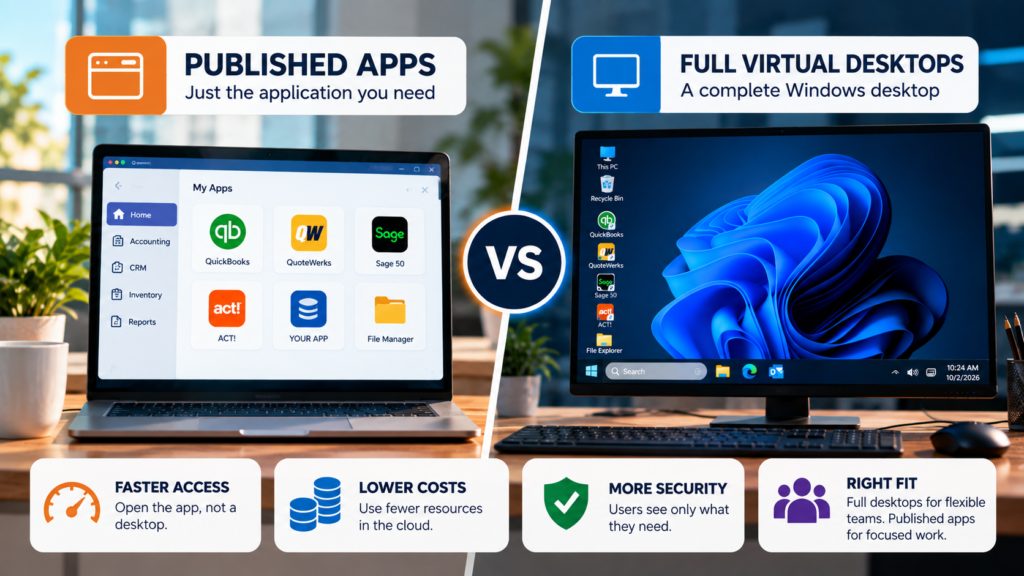
Get quotes from three hosting providers and you may hear three different answers about what your staff will see at sign-in. One provider hands everyone a full Windows desktop. Another shows nothing but the application. Parallels RAS published apps vs VDI comes down to one question: does your team need the whole desktop, or the one program?
That choice changes what you pay and how much can go wrong. Most quotes bury it in a line item.
Published-app hosting means users see your application in a browser or client, not a full virtual desktop. VDI, short for virtual desktop infrastructure, gives each user a complete Windows desktop to work inside.
AT A GLANCE
- Published apps show one application. VDI shows a whole desktop with that application inside it.
- For a company running a few business programs, published apps tend to be faster to reach, cheaper to run, and harder to misuse.
- Some teams do need the full desktop, and this post says which ones.
Parallels RAS Published Apps vs VDI: The Same Tuesday, Two Setups
The scenario below is illustrative. We made up Maria and her 12-person manufacturer to show the difference, and the software is the same in both versions of her day.
Dev finds a free utility online and wants to try it. On a full desktop he has somewhere to do that, and stopping him means lockdown work somebody has to build and keep up. In a published app session he gets one application window. No desktop, so nowhere to try it from.
Maria got the same software both times. The second setup gave her less to look at, and less to go wrong. Most teams we host want one program to work and have no use for the rest of Windows around it.
A full desktop looks like the premium option because there’s more of it. For a shop running one ERP, more of it means more to patch and more to lock down. We’d take the single window.
Are Published Apps Faster and More Secure Than VDI?
For a company running a handful of business applications, yes. No desktop gets built at sign-in, so people reach the software sooner. There are also fewer things to attack and fewer things for a tired employee to click on a Friday afternoon.
Don’t read too much into the label, though. A published app on a tenant nobody took the time to configure is still a risk. What gets set up matters more than what it’s called. Who configures what is in our post on Azure SOC 2 and shared responsibility.
When a Full Virtual Desktop Is the Better Call
In the Parallels RAS published apps vs VDI decision, some teams need the desktop. IT staff who run admin tools all day. Users who work across a dozen programs and treat Windows as their workspace. Software that expects a desktop around it and misbehaves without one. A published app will frustrate those people.
Our default is published apps, built on Azure and Parallels RAS. If you think part of your team needs full desktops, raise it on the first call and we’ll tell you straight whether we’re the right fit.
To see published apps in a working day, read our auto shop remote access walkthrough. CloudTop SaaS is a CloudTop Office company, hosting Windows business software since 2000 through the parent brand.
FAQ
Not sure whether your team needs a whole desktop or one app?
A 15-minute call sorts that out, and tells you what each option would involve.