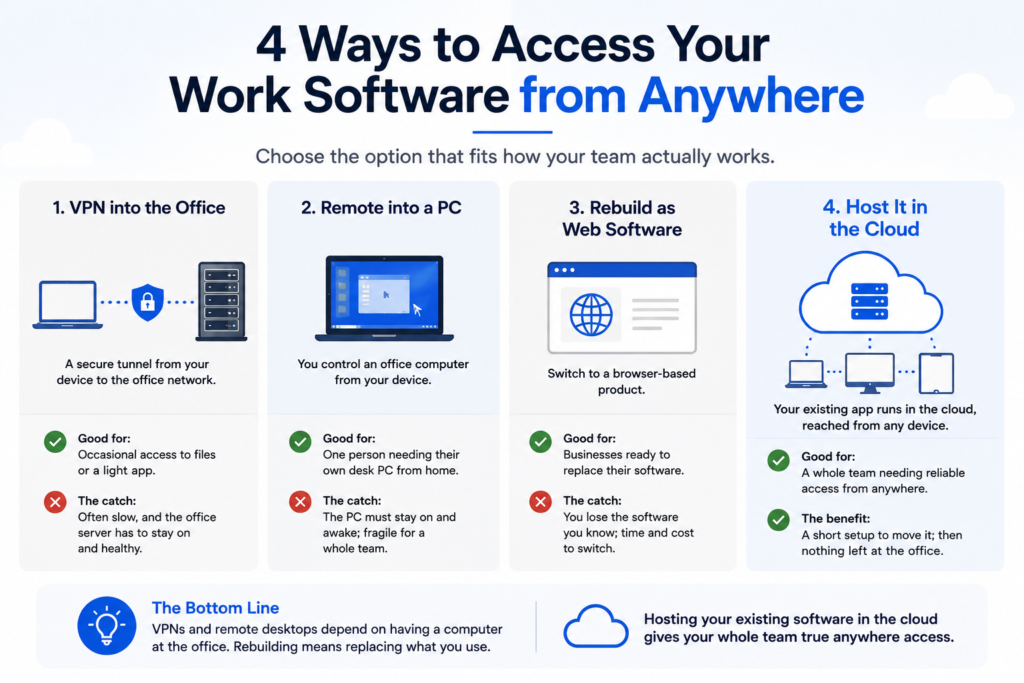
To access your work software from anywhere, you have a few real options: connect over a VPN, remote into a PC left on at the office, rebuild the software as a web app, or host the software you already use in the cloud. For a whole team, hosting is the one that works cleanly, because your actual application runs in the cloud and everyone reaches it from a browser, a Mac, a PC, or a tablet, with no computer left running at the office. This guide walks through each option in plain English, including where the common ones fall short, so you can pick the one that fits how your team actually works.
The short version
- Your software feels stuck at the office because it lives on a server or PC tied to one location.
- A VPN works but is often slow and depends on the office machine staying on.
- Remote-into-a-PC tools are fine for one person, fragile for a team.
- Rebuilding as web software works but means replacing what you use.
- Hosting your existing software in the cloud gives the whole team access from any device, with nothing left running at the office.
How can you access your work software from anywhere?
You access your work software from anywhere by putting it somewhere your team can reach over the internet, instead of on a machine that only works inside the office. There are four common ways to do that, and they are not equal. A VPN and a remote-desktop tool both lean on a computer staying on at the office. Rebuilding as a web app means giving up the software you know. Hosting your existing software in the cloud is the one that lets a whole team work from anywhere without any of those catches. The rest of this guide compares them.
Why can’t you already reach your software from home?
Because it lives in one place. Most business software runs on a server or a specific PC in your office, and it was set up to be used from inside the building. When you try to work from home, there is nothing on the other end to connect to unless you set up a way in. That is the whole problem: the software is fine, but it is tied to a location. Every method below is just a different way to untie it.
The ways to access your work software remotely
Here are the four common options side by side, with the honest catch on each.
| Method | How it works | Good for | The catch |
|---|---|---|---|
| VPN into the office | A secure tunnel from your device to the office network | Occasional access to files or a light app | Often slow, and the office server has to stay on and healthy |
| Remote into a PC | You control an office computer from your device | One person needing their own desk PC from home | The PC must stay on and awake; fragile for a whole team |
| Rebuild as web software | Switch to a browser-based product | Businesses ready to replace their software | You lose the software you know; time and cost to switch |
| Host it in the cloud | Your existing app runs in the cloud, reached from any device | A whole team needing reliable access from anywhere | A short setup to move it; then nothing left at the office |
VPN: the common first try, and where it falls short
A VPN is where most businesses start, and it does work for light use. It creates a secure tunnel from your laptop to the office network, so you can reach files or a simple app from home. The trouble shows up under real use: it is often slow, especially for a database-heavy application, and it still depends on the office server being on and healthy. If that machine hiccups, everyone working remotely is stuck. A VPN untethers you from the building, but it does not free you from the server.
Remote into your office PC tools
Remote-desktop tools let you take over an office computer from home, seeing its screen on your own device. For one person who just needs their desk PC occasionally, that is fine. For a team, it gets fragile fast: every person needs a machine left on and awake at the office, and if the power blips or someone shuts a computer down, that person is locked out. It is a workaround, not a foundation, and it turns your office into a room full of computers that can never be turned off.
Rebuilding as web software (SaaS)
You can also switch to a browser-based product built for the web, which gives you anywhere-access by design. That is a genuine option, and sometimes the right long-term move. The cost is real, though: you give up the software your team knows, you migrate your data into a new system, and you retrain everyone. If your current software works fine and the only thing missing is remote access, replacing the whole thing to get it is a big swing for a small problem. For how to weigh that, see cloud vs on-premise software.
Hosting your software in the cloud: access from any device, no office machine required
Hosting is the option that solves remote access without any of the catches. Your existing Windows software is moved to a managed environment in the cloud and published, so your team signs in and sees the app itself, not a desktop or a remote PC, from a browser, a Mac, a PC, or a tablet. There is no office server or computer that has to stay on, because the software no longer lives at the office. Everyone works from the same live data, whether they are at a desk, at home, or on a job site. You keep the software you know, and remote access stops being a workaround and becomes the normal way it runs. If you want to confirm your app qualifies, see can my software be hosted.
What about printing, scanning, and signature pads from home?
They work. A common worry about remote access is that the everyday hardware stops working, but with hosted software, printing to your local printer, scanning, and signature pads are all standard. Your team can print an invoice at home, scan a document from a branch, or capture a signature at the door, the same as they would in the office. We confirm your exact devices on the discovery call so nothing catches you out after you go live.
Is remote access to my software secure?
Hosted remote access is generally safer than leaving a PC on with a remote tool, though security always depends on the controls in place. With hosting, every login uses multi-factor sign-in, data is encrypted in transit and at rest, and automated daily backups run in the background. Compare that to a home setup where someone remote-controls an always-on office computer, which is far easier to get wrong. CloudTop SaaS runs environments in US Azure regions and inherits Azure’s SOC 2 and ISO attestations, configured for business workloads. We do not claim HIPAA or PCI certification on our own behalf; for regulated data, we walk through the shared-responsibility model with you.
For software vendors: giving your customers remote access
If you make the software, “can I use this from home?” is a question your customers keep asking. You can answer yes without rebuilding your product as a web app. Offer a hosted edition under your brand, and we handle the infrastructure so your customers get anywhere-access to your existing software. It buys you time on a full rewrite while keeping customers from leaving for a competitor that already has remote access. More on that in offering a hosted version of your software.
How CloudTop SaaS gives your team access from anywhere
We take the Windows software you already run and host it on Microsoft Azure, published so your team reaches it from any device, with nothing left running at the office. Every environment gets MFA, encryption, automated daily backups, and monitoring, run by US-based engineers. In most cases you bring your own license, you own your data, and there is no lock-in. A typical single-app setup is live in under 48 hours, with complex cases taking longer, and we tell you which upfront. CloudTop SaaS is a CloudTop Office company, and CloudTop Office has hosted Windows business software since 2000, with more than 500 businesses onboarded. To go deeper, start with our guide to cloud hosting for small business.
Frequently asked questions
How can I access my work software from anywhere?
By putting it somewhere your team can reach over the internet. The common ways are a VPN, remoting into an office PC, rebuilding as web software, or hosting your existing software in the cloud. For a whole team, hosting works cleanest, because your app runs in the cloud and everyone reaches it from any device.
Can I use my Windows software from home without leaving my office PC on?
Yes, if you host it. Hosting moves your software to the cloud, so there is no office computer that has to stay on and awake. VPN and remote-desktop tools, by contrast, both depend on an office machine running.
Is a VPN enough to work remotely?
For light use, sometimes. A VPN can be slow for a database-heavy app, and it still depends on the office server staying on and healthy. For a whole team working remotely every day, hosting is more reliable.
Do I have to replace my software to get remote access?
No. You can host your existing Windows software in the cloud as-is and get anywhere-access without switching products. Rebuilding as a web app is one option, but it is not required just to work remotely.
Is remote access to my business software secure?
Hosted remote access is generally safer than a PC left on with a remote tool. It comes with MFA on every login, encryption in transit and at rest, and tested daily backups. Security is shared, but you are not relying on an always-on office computer.
Will printing and scanning work when I access my software remotely?
Yes. With hosted software, local printing, scanning, and signature pads are all standard, so your team can print, scan, and capture signatures from home or a branch the same as in the office. We confirm your exact devices before go-live.
Want your team working from anywhere?
Tell us what you run, and we will show you what anywhere-access would look like and cost, in writing, the same day. Book a 15-minute consult to see how your software qualifies. Software vendor whose customers want remote access? Ask us how to become a hosting partner.
CloudTop SaaS, a CloudTop Office company, cloud-hosts the Windows business software you already run on Microsoft Azure with Parallels RAS. US engineers, automated backups, no rebuild required. From hello to hosted in under 48 hours. For named-app hosting such as QuickBooks, Sage, Act!, and QuoteWerks, see our parent brand, CloudTop Office.