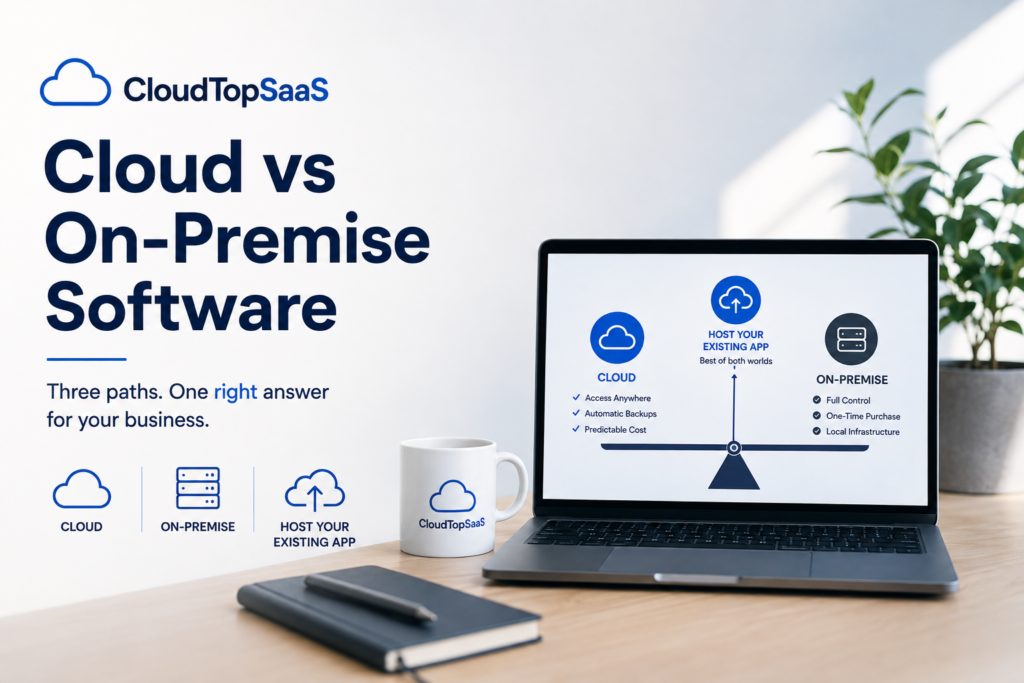
Cloud vs on-premise software comes down to a trade between control and convenience. On-premise means the software runs on hardware you own and manage in your office. Cloud means it runs on managed servers you reach over the internet. On-premise gives you direct control and a one-time purchase. Cloud gives you access from anywhere, automatic backups, and a predictable bill, without a server to babysit. For most small businesses, cloud wins on everything except a few specific cases. There is also a third option most comparisons skip, and we will get to it: hosting the on-premise software you already run in the cloud, without replacing it.
Key takeaways
- On-premise software runs on hardware you own; cloud runs on managed servers you reach over the internet.
- On-premise offers control and a one-time buy; cloud offers access from anywhere, backups, and predictable cost.
- For most small businesses, cloud wins, but on-premise still fits a few cases like strict data control or no reliable internet.
- You do not have to choose between the two extremes. You can host your existing on-premise software in the cloud, with no rebuild.
- CloudTop SaaS, a CloudTop Office company, hosts the software you already run on Microsoft Azure, with US engineers and no lock-in.
Cloud vs on-premise software: which should you choose?
For most small businesses, cloud is the better choice, because the things it handles for you, remote access, backups, security, and maintenance, are the things a small team rarely has time to do well. On-premise wins when you have a hard reason to keep everything in-house: strict control requirements, unreliable internet, or software tied to specific hardware. The honest answer is not “cloud always.” It is “cloud usually, on-premise when you have a specific reason, and hosting your existing app when you want the benefits of cloud without giving up the software you know.”
What’s the difference between cloud and on-premise software?
On-premise software runs on servers and computers you own, located in your office, and you are responsible for everything: the hardware, the updates, the backups, and the security. Cloud software runs on servers in a data center that someone else manages, and you reach it over the internet from any device. The core difference is who owns and runs the infrastructure. With on-premise, that is you. With cloud, that is the provider, which is why cloud shifts the day-to-day burden off your plate.
Cloud vs on-premise: the full comparison
Here is how the two stack up across the factors that matter to a small business.
| Factor | On-premise software | Cloud |
|---|---|---|
| Where it runs | On a server you own, in your office | On managed servers in a data center |
| Upfront cost | High one-time hardware and license purchase | Low; no hardware to buy |
| Ongoing cost | Hidden: power, IT, backups, a refresh every few years | Predictable per-user bill |
| Remote access | Extra setup, often a clunky VPN | Built in, from any device |
| Backups and recovery | Your responsibility, easy to neglect | Automated daily backups, tested |
| Security responsibility | Entirely yours to configure and patch | Shared; MFA and encryption standard, provider patches the platform |
| Maintenance and IT | You or a consultant keep it running | Handled by the provider |
| Adding users | Reinstall and reconfigure | Provision an account |
| Control and customization | Full control over the environment | Less low-level control, managed for you |
| Uptime | Only as reliable as your hardware | Backed by an SLA and monitoring |
When on-premise still makes sense
On-premise is not dead, and pretending it is would be dishonest. Keeping software in-house makes sense when you have strict requirements to hold data on your own hardware, when your location does not have reliable internet, when the software is tied to on-site machinery it has to control directly, or when you just bought the server and the money is already spent. In those cases, the control and the sunk cost can outweigh the convenience of cloud. If none of those apply to you, though, the reasons to stay on-premise get thin fast.
When cloud makes sense
Cloud makes sense the moment your business stops fitting neatly inside one office. If your team works from more than one location, if people need access from home or the field, if your server is aging, if your backups are shaky, or if you have little in-house IT, cloud solves problems on-premise cannot. It also turns a lumpy capital purchase into a predictable monthly cost, which is easier to plan around. For a deeper look at the money side, see server vs cloud hosting cost.
The option most articles skip: host your on-premise software in the cloud
Most cloud-vs-on-premise articles present a false choice: keep your server, or throw out your software and switch to a browser-based product. There is a third path. You can take the on-premise software you already run and host it in the cloud as-is, with no rewrite and no new product to learn. Your team keeps the tool they know and the data inside it, and you get the cloud benefits: remote access, automatic backups, and no server to maintain. It is the practical middle ground, and it is what we do. If you are weighing whether to host or replace your software entirely, lift-and-shift or rip-and-replace walks through that decision.
Which is right for you?
Tick what applies. If you check most of these, hosting your software in the cloud is very likely the right move.
Cost, security, and control: the three questions people actually ask
On cost, cloud usually wins once you count the hidden expenses of a server: IT time, backups, downtime, and replacement. On security, cloud is often stronger for a small business, because MFA, encryption, and a patched platform come standard, though the responsibility is shared rather than gone. On control, on-premise gives you more low-level control, which matters to a few businesses and not to most. Weigh the one that actually applies to you, and ignore the debate on the other two.
For software vendors: cloud vs on-premise for your product
If you make software, your customers are running this same debate about your product, and some of them will leave if you cannot offer cloud. You do not have to rebuild your on-premise app as a browser-based SaaS to answer that, at least not right away. You can offer a hosted edition of your existing product under your brand, giving customers cloud access now while you decide whether a full rewrite is worth it later. We host your Windows product, coordinate licensing, and provision users, so the cloud-vs-on-premise question stops costing you customers. More on that in offering a hosted version of your software.
How CloudTop SaaS fits in
We are the third option. We take the on-premise Windows software you already run and host it on Microsoft Azure, published so your team reaches it from anywhere, without replacing a thing. Every environment gets MFA, encryption, automated daily backups, and monitoring, run by US-based engineers. In most cases you bring your own license, you own your data, and there is no lock-in. A typical single-app setup is live in under 48 hours, with complex cases taking longer, and we tell you which upfront. CloudTop SaaS is a CloudTop Office company, and CloudTop Office has hosted Windows business software since 2000, with more than 500 businesses onboarded. To go deeper, start with our guide to cloud hosting for small business.
Frequently asked questions
What’s the difference between cloud and on-premise software?
On-premise software runs on hardware you own and manage in your office, and you handle updates, backups, and security. Cloud software runs on managed servers in a data center that you reach over the internet, and the provider runs the infrastructure. The core difference is who owns and maintains the servers.
Is cloud cheaper than on-premise?
Usually, once you count the full cost. On-premise looks cheaper because the purchase is one-time, but it hides IT labor, backups, downtime, and a server refresh every few years. Cloud bundles most of that into one predictable per-user bill.
Is on-premise more secure than the cloud?
Not usually, for a small business. On-premise gives you full control, but it also makes every security task your job. Cloud comes with MFA, encryption, and a patched platform as standard, though security is a shared responsibility rather than something the provider handles entirely.
Can I keep my on-premise software but still get cloud access?
Yes. This is the option most comparisons skip. You can host your existing on-premise Windows software in the cloud as-is, so you keep the software you know and gain remote access, backups, and no server to maintain, without a rewrite.
As a software vendor, should I go cloud or stay on-premise?
You can do both in sequence. Offer a hosted edition of your on-premise product now so customers get cloud access, and decide later whether a full rewrite as browser-based SaaS is worth it. Hosting under your brand keeps customers from leaving while you build.
Not sure which fits your business?
Tell us what you run and how your team works, and we will give you a straight answer on cloud, on-premise, or hosting what you already have. Book a 15-minute consult to see how your software qualifies. Software vendor weighing cloud vs on-premise for your product? Ask us how to become a hosting partner.
CloudTop SaaS, a CloudTop Office company, cloud-hosts the Windows business software you already run on Microsoft Azure with Parallels RAS. US engineers, automated backups, no rebuild required. From hello to hosted in under 48 hours. For named-app hosting such as QuickBooks, Sage, Act!, and QuoteWerks, see our parent brand, CloudTop Office.