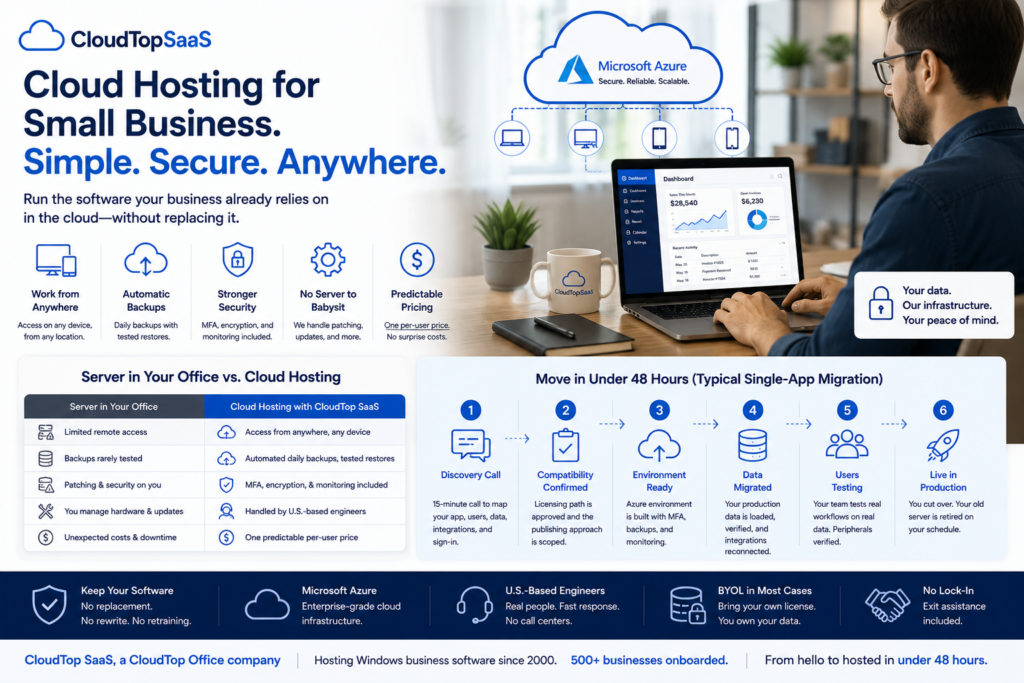
Cloud hosting for small business means running the software your company already uses on servers in a data center instead of on a machine in your office, so your team can reach it from anywhere. For most small businesses, that means taking the Windows program you rely on every day and hosting it in the cloud, without replacing it, rewriting it, or learning anything new. You get remote access, automatic backups, and one predictable bill, and you stop worrying about the server in the closet. This guide explains it in plain English: what cloud hosting is, what it costs, whether it is secure, and how you actually move.
Key takeaways
- Cloud hosting runs your existing software in a data center, so your team works from anywhere on any device.
- You do not have to replace or rewrite your Windows software to move it to the cloud.
- It trades an aging server and its hidden costs for remote access, automatic backups, and one predictable per-user bill.
- A typical single-app move takes under 48 hours, and your old server stays live until you switch off.
- CloudTop SaaS, a CloudTop Office company, hosts the software you already run on Microsoft Azure, with US engineers and no lock-in.
What is cloud hosting for a small business?
Cloud hosting for a small business means your software and data live on professionally managed servers in a data center, not on a computer in your office. You reach the software over the internet from a laptop, a tablet, or a phone. Instead of buying, running, and replacing your own server, you pay a provider to run it for you, and they handle the hardware, the backups, and the security underneath. The software you use does not change. Where it runs does.
How does cloud hosting actually work?
A provider sets up a secure environment in the cloud, installs or moves your application into it, and gives your team a way to sign in from anywhere. At CloudTop SaaS, that environment runs on Microsoft Azure, and your app is published so people see just the software, not a whole desktop. Your data moves into the environment, your integrations reconnect, and your staff log in with their own accounts. From their side, it feels the same as before, except now they can work from the office, from home, or from a job site, all on the same live data.
Do you have to replace your software to move to the cloud?
No. This is the part most owners get wrong. Moving to the cloud does not mean buying new software or switching to a web app. Your existing Windows program gets hosted as-is, so you keep the tool your team already knows and the years of data inside it. If you want to check whether your specific software qualifies, we cover that in can my software be hosted. In most cases, if it runs on Windows and more than one person uses it, the answer is yes.
What are the benefits of cloud hosting for a small business?
The benefits are the things a small business rarely has time or staff to handle well on its own:
- Work from anywhere. Staff reach the software from home, the office, or the field, on any device.
- Automatic backups. Your data is backed up daily and tested, instead of riding on a script nobody checks.
- Better security. Multi-factor sign-in and encryption come standard, without you configuring them.
- No server to babysit. No patching, no failing hardware, no replacement every few years.
- Predictable cost. One per-user bill instead of a big purchase plus a pile of hidden costs.
Cloud hosting vs keeping a server in the office
Here is the honest side-by-side. For a fuller look at the money, see server vs cloud hosting cost.
| Factor | Server in the office | Cloud hosting |
|---|---|---|
| Remote access | Extra setup, often a clunky VPN | Built in, from any device |
| Backups and recovery | Your responsibility, rarely tested | Automated daily backups with tested restores |
| Security | Patching and monitoring on you | MFA, encryption, and monitoring included |
| IT burden | You or a consultant keep it alive | Handled by the provider’s US engineers |
| Adding a user | Reinstall and reconfigure | Provision an account and they sign in |
| Uptime | Only as reliable as your hardware | 99.9% uptime SLA with monitoring |
| Replacing your software | Not required either way | Not required; your app runs as-is |
| Cost shape | Big purchase plus hidden recurring costs | Predictable per-user cost, no hardware |
Types of cloud hosting, explained
The cloud world is full of acronyms. Here is what the common ones actually mean for a small business.
For most small businesses, the right model is a published app on managed hosting, which is lighter and cheaper than a full desktop. We break that down in published app hosting vs a full virtual desktop.
How much does cloud hosting cost for a small business?
Cloud hosting usually costs a predictable amount per user each month, and for most small businesses it works out cheaper than running a server once you count everything. A server looks like a one-time purchase, but it carries backups, security, IT labor, downtime, and a replacement every few years. Hosting bundles most of that into one bill. In most cases you also bring your own software licenses, so you are not paying for the software twice. The exact number depends on your setup, which is why an honest provider quotes it per environment rather than off a rate card.
Is cloud hosting secure for a small business?
For most small businesses, hosted is safer than a single office server, though security always depends on the controls in place. A good provider enforces multi-factor sign-in on every login, encrypts your data in transit and at rest, and runs automated daily backups you can actually restore from. CloudTop SaaS runs environments in US Azure regions and inherits Azure’s SOC 2 and ISO attestations, configured for business workloads. We do not claim HIPAA or PCI certification on our own behalf; for regulated data, we walk through the shared-responsibility model with you. If you want to understand who controls your data in a hosting arrangement, read who owns your data when you host with a provider.
How do you move to the cloud, and how long does it take?
The move follows a short path: a discovery call, a compatibility check, an environment build, a data move, testing, and go-live. For a typical single app, the whole thing takes under 48 hours, and your old server stays live until you cut over, so nothing goes dark. Complex setups with multiple databases or custom integrations take longer, and a straight provider tells you which one you are before you commit. The full walkthrough is in on-prem server to cloud migration, and if you are weighing whether to host or replace the software entirely, see lift-and-shift or rip-and-replace.
For software vendors: offering cloud hosting to your customers
If you make software, your small business customers are asking for cloud access you may not be ready to build. You can offer it now by white-labeling a hosting partner: we host your Windows product under your brand, coordinate licensing, and provision users, while your customers and the relationship stay yours. It turns a feature request you cannot ship into a cloud option you can offer this week. The details are in offering a hosted version of your software and how BYOL works.
How CloudTop SaaS does cloud hosting for small business
We host the Windows business software you already run on Microsoft Azure, published so your team sees the app, not the operating system. Every environment gets MFA, encryption, automated daily backups, and monitoring, run by US-based engineers who answer their own tickets. In most cases you bring your own license, you own your data, and there is no lock-in. We confirm fit on a 15-minute call and send a written summary the same day, and a typical single-app setup is live in under 48 hours. CloudTop SaaS is a CloudTop Office company, and CloudTop Office has hosted Windows business software since 2000, with more than 500 businesses onboarded, so a new brand rests on a long track record.
Frequently asked questions
What is cloud hosting for a small business?
It means running your software and data on managed servers in a data center instead of on a computer in your office, reached over the internet from any device. You keep the software you use; a provider runs the hardware, backups, and security for you.
Do I have to replace my software to move to the cloud?
No. Your existing Windows software is hosted as-is, so you keep the tool your team knows and the data inside it. There is no rewrite and no new product to learn.
Is cloud hosting cheaper than running a server?
Usually, once you count the full cost. A server’s purchase price hides backups, security, IT labor, downtime, and a refresh every few years. Hosting bundles most of that into one predictable per-user bill, which is cheaper for most small businesses.
Is cloud hosting secure for a small business?
For most small businesses, hosted is safer than a single office server. A good provider enforces MFA, encrypts data in transit and at rest, and runs tested daily backups. Azure’s SOC 2 and ISO attestations are inherited by the host and configured for business workloads.
How long does it take to move to the cloud?
For a typical single app, under 48 hours from the discovery call to a live environment, with your old server staying live until you cut over. Complex, multi-database setups take longer, and a good provider tells you the realistic timeline upfront.
What kind of software can be hosted?
Most Windows software that serves more than one user. Line-of-business apps, industry-specific programs, and older software all typically qualify. Tools that already run fully in a browser do not need hosting.
As a software vendor, can I offer cloud hosting to my customers?
Yes. We host your Windows product under your brand and coordinate licensing, so you can offer cloud access to your customers without building the infrastructure yourself. Your customers and the relationship stay with you.
Ready to move your small business to the cloud?
Tell us what you run, and we will confirm whether we can host it and what it would cost, in writing, the same day. Book a 15-minute consult to see how your software qualifies. Software vendor weighing a hosted edition for your customers? Ask us how to become a hosting partner.
CloudTop SaaS, a CloudTop Office company, cloud-hosts the Windows business software you already run on Microsoft Azure with Parallels RAS. US engineers, automated backups, no rebuild required. From hello to hosted in under 48 hours. For named-app hosting such as QuickBooks, Sage, Act!, and QuoteWerks, see our parent brand, CloudTop Office.